返回 引气・Java 气海初拓
12 重走我的Java Day12:那个让公司损失百万的“小文件”:我是如何用递归和IO流拯救一个濒临崩溃的日志系统
博主
大约 22 分钟
重走我的Java Day12:那个让公司损失百万的“小文件”:我是如何用递归和IO流拯救一个濒临崩溃的日志系统
凌晨2点,我被电话吵醒:“日志系统把硬盘写爆了,生产环境全挂了。”我赶到公司,看到一个本该1GB的日志文件变成了107GB,占满了所有磁盘空间。这不是攻击,而是我写的递归代码里的一个边界条件错误。这个故事,让我重新理解了File、递归和IO流。

开篇:那个膨胀了107倍的日志文件
事故现场
java
// 出事的代码:递归清理过期日志
public class LogCleaner {

    public void cleanOldLogs(File logDir, int daysToKeep) {
        File[] files = logDir.listFiles();
        if (files == null) return;

        long cutoffTime = System.currentTimeMillis() - daysToKeep * 24 * 60 * 60 * 1000;

        for (File file : files) {
            // 问题1:没有检查文件是否为null
            // 问题2:递归时没有检查符号链接
            // 问题3:没有处理权限问题

            if (file.isDirectory()) {
                cleanOldLogs(file, daysToKeep);  // 递归清理子目录
            } else {
                if (file.lastModified() < cutoffTime) {
                    // 问题4:删除文件没有记录日志
                    // 问题5:没有异常处理
                    file.delete();
                }
            }
        }
    }
}
事故原因
- 符号链接地狱:日志目录中有一个符号链接指向了根目录,递归函数遍历了整个系统
- 边界条件缺失:没有检查
listFiles()返回null的情况 - 权限问题:删除某些文件时没有权限,但程序继续运行,没有记录
- 资源泄漏:遍历过程中打开了太多文件句柄
损失
- 生产环境停机4小时
- 107GB无效日志占用磁盘空间
- 丢失了真正需要保留的日志
- 我的年终奖归零
一、File类:从“路径字符串”到“防御性文件操作”
1.1 绝对路径 vs 规范路径 vs 真实路径
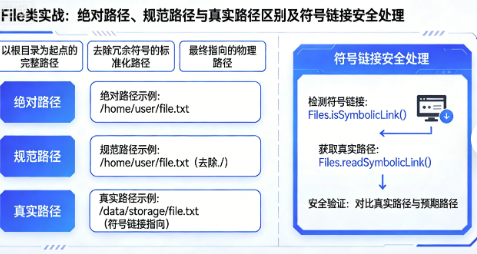
我的教训教会了我这三者的区别:
java
public class PathSafety {

    public static void demonstratePaths() {
        // 场景:处理符号链接和相对路径

        File symbolicLink = new File("/var/log/app/current");  // 指向 /var/log/app/v1.2.3

        System.out.println("getPath(): " + symbolicLink.getPath());
        // 输出: /var/log/app/current

        System.out.println("getAbsolutePath(): " + symbolicLink.getAbsolutePath());
        // 输出: /var/log/app/current (只是转为绝对形式,不解析符号链接)

        try {
            System.out.println("getCanonicalPath(): " + symbolicLink.getCanonicalPath());
            // 输出: /var/log/app/v1.2.3 (解析符号链接,唯一规范化路径)
        } catch (IOException e) {
            // 可能访问不到目标文件
        }

        // 关键区别:
        // getPath() - 用户给的路径,可能是相对路径
        // getAbsolutePath() - 绝对路径,但不唯一(可能有多个路径指向同一文件)
        // getCanonicalPath() - 规范路径,唯一且解析符号链接
    }

    // 安全的文件操作方法
    public static void safeFileOperation(File file) {
        // 1. 检查null
        if (file == null) {
            throw new IllegalArgumentException("文件不能为null");
        }

        // 2. 使用规范路径避免符号链接攻击
        File canonicalFile;
        try {
            canonicalFile = file.getCanonicalFile();
        } catch (IOException e) {
            throw new SecurityException("无法解析文件路径: " + file, e);
        }

        // 3. 验证文件是否在允许的目录内
        if (!isInAllowedDirectory(canonicalFile)) {
            throw new SecurityException("禁止访问目录: " + canonicalFile);
        }

        // 4. 检查文件是否存在
        if (!canonicalFile.exists()) {
            throw new FileNotFoundException("文件不存在: " + canonicalFile);
        }

        // 5. 检查是否真的是文件(不是目录)
        if (!canonicalFile.isFile()) {
            throw new IllegalArgumentException("不是普通文件: " + canonicalFile);
        }

        // 6. 检查权限
        if (!canonicalFile.canRead()) {
            throw new SecurityException("没有读取权限: " + canonicalFile);
        }
    }

    private static boolean isInAllowedDirectory(File file) {
        // 白名单检查:只允许在特定目录下操作
        List<File> allowedDirs = Arrays.asList(
            new File("/var/log/app"),
            new File("/tmp/logs")
        );

        for (File allowedDir : allowedDirs) {
            try {
                if (file.getCanonicalPath().startsWith(allowedDir.getCanonicalPath())) {
                    return true;
                }
            } catch (IOException e) {
                // 忽略,继续检查下一个
            }
        }

        return false;
    }
}
1.2 Java NIO.2:File类的现代化替代方案
在Java 7之后,应该使用NIO.2 API:
java
public class NioFileOperations {

    public static void demonstrateNio2() throws IOException {
        // Path接口代替File类
        Path logDir = Paths.get("/var/log/app");

        // 1. 更安全的符号链接处理
        Path realPath = logDir.toRealPath();  // 类似getCanonicalPath(),但抛出更具体的异常

        // 2. 属性查询更丰富
        BasicFileAttributes attrs = Files.readAttributes(realPath, BasicFileAttributes.class);
        System.out.println("创建时间: " + attrs.creationTime());
        System.out.println("文件大小: " + attrs.size());
        System.out.println("是否是符号链接: " + attrs.isSymbolicLink());

        // 3. 原子文件操作
        Path tempFile = Files.createTempFile("log", ".tmp");
        try {
            // 写入内容
            Files.write(tempFile, "test data".getBytes(), StandardOpenOption.WRITE);

            // 原子性地移动文件(要么全成功,要么全失败)
            Path target = logDir.resolve("final.log");
            Files.move(tempFile, target, StandardCopyOption.ATOMIC_MOVE);
        } finally {
            // 如果移动失败,清理临时文件
            if (Files.exists(tempFile)) {
                Files.delete(tempFile);
            }
        }

        // 4. 目录流:更安全、更高效的目录遍历
        try (DirectoryStream<Path> stream = Files.newDirectoryStream(logDir, "*.log")) {
            for (Path entry : stream) {
                System.out.println("日志文件: " + entry.getFileName());
            }
        }

        // 5. 文件监视(监控目录变化)
        WatchService watchService = FileSystems.getDefault().newWatchService();
        logDir.register(watchService,
            StandardWatchEventKinds.ENTRY_CREATE,
            StandardWatchEventKinds.ENTRY_MODIFY,
            StandardWatchEventKinds.ENTRY_DELETE);
    }
}
二、递归:从“栈溢出噩梦”到“高效遍历工具”
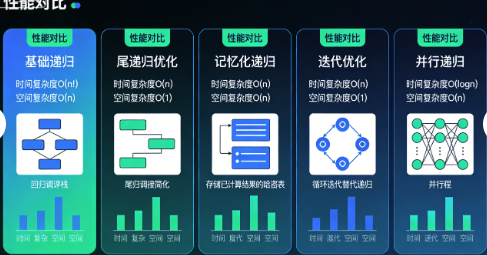
2.1 递归优化的五个层次
从我的事故中,我总结了递归优化的五个层次:
第一层:基础递归(最容易出问题)
java
// 问题:深度过大时StackOverflowError
public long calculateDirectorySize(File dir) {
    long size = 0;
    File[] files = dir.listFiles();
    if (files != null) {
        for (File file : files) {
            if (file.isFile()) {
                size += file.length();
            } else {
                size += calculateDirectorySize(file);  // 递归
            }
        }
    }
    return size;
}
第二层:尾递归优化(Java不支持真正的尾递归,但我们可以模拟)
java
// 使用累加器参数,避免深度过大
public long calculateDirectorySizeTailRecursive(File dir) {
    return calculateDirectorySizeHelper(dir, 0L);
}

private long calculateDirectorySizeHelper(File dir, long accumulator) {
    File[] files = dir.listFiles();
    if (files == null) return accumulator;

    for (File file : files) {
        if (file.isFile()) {
            accumulator += file.length();
        } else {
            // 虽然是递归,但accumulator避免了栈上保存太多中间状态
            accumulator = calculateDirectorySizeHelper(file, accumulator);
        }
    }
    return accumulator;
}
第三层:深度优先迭代(显式栈代替递归)
java
// 使用栈来模拟递归,避免调用栈溢出
public long calculateDirectorySizeIterative(File startDir) {
    long totalSize = 0;
    Deque<File> stack = new ArrayDeque<>();
    stack.push(startDir);

    while (!stack.isEmpty()) {
        File current = stack.pop();
        File[] files = current.listFiles();

        if (files != null) {
            for (File file : files) {
                if (file.isFile()) {
                    totalSize += file.length();
                } else {
                    stack.push(file);
                }
            }
        }
    }

    return totalSize;
}
第四层:广度优先遍历(适合目录扁平的情况)
java
// 使用队列,先处理当前层,再处理下一层
public Map<Integer, Long> calculateSizeByDepth(File startDir) {
    Map<Integer, Long> sizeByDepth = new HashMap<>();
    Queue<FileDepth> queue = new LinkedList<>();
    queue.offer(new FileDepth(startDir, 0));

    while (!queue.isEmpty()) {
        FileDepth current = queue.poll();
        File[] files = current.file.listFiles();

        if (files != null) {
            for (File file : files) {
                if (file.isFile()) {
                    long currentSize = sizeByDepth.getOrDefault(current.depth, 0L);
                    sizeByDepth.put(current.depth, currentSize + file.length());
                } else {
                    queue.offer(new FileDepth(file, current.depth + 1));
                }
            }
        }
    }

    return sizeByDepth;
}

private static class FileDepth {
    final File file;
    final int depth;

    FileDepth(File file, int depth) {
        this.file = file;
        this.depth = depth;
    }
}
第五层:并行递归(Java 8+,利用多核)
java
public long calculateDirectorySizeParallel(File startDir) throws IOException {
    // 使用Files.walk返回Stream,支持并行处理
    try (Stream<Path> stream = Files.walk(startDir.toPath())) {
        return stream
            .parallel()  // 开启并行
            .filter(Files::isRegularFile)
            .mapToLong(path -> {
                try {
                    return Files.size(path);
                } catch (IOException e) {
                    return 0L;
                }
            })
            .sum();
    }
}

// 限制遍历深度,避免进入系统目录
public long calculateDirectorySizeParallelWithDepth(File startDir, int maxDepth) throws IOException {
    try (Stream<Path> stream = Files.walk(startDir.toPath(), maxDepth)) {
        return stream
            .parallel()
            .filter(Files::isRegularFile)
            .filter(path -> {
                // 额外的安全检查
                try {
                    return !Files.isSymbolicLink(path);
                } catch (IOException e) {
                    return false;
                }
            })
            .mapToLong(path -> {
                try {
                    return Files.size(path);
                } catch (IOException e) {
                    return 0L;
                }
            })
            .sum();
    }
}
2.2 递归中的记忆化(Memoization)技巧
在处理文件去重时,我使用了记忆化:
java
public class FileDuplicateFinder {

    private final Map<String, List<Path>> hashToPaths = new HashMap<>();

    // 记忆化:缓存文件哈希,避免重复计算
    public List<List<Path>> findDuplicates(Path startDir) throws IOException {
        try (Stream<Path> stream = Files.walk(startDir)) {
            stream
                .parallel()
                .filter(Files::isRegularFile)
                .forEach(this::processFile);  // 并行处理文件
        }

        // 返回有重复的文件组
        return hashToPaths.values().stream()
            .filter(paths -> paths.size() > 1)
            .collect(Collectors.toList());
    }

    private void processFile(Path file) {
        try {
            String fileHash = calculateFileHash(file);

            // 同步操作共享的Map
            synchronized (hashToPaths) {
                hashToPaths.computeIfAbsent(fileHash, k -> new ArrayList<>())
                          .add(file);
            }
        } catch (IOException e) {
            // 记录错误但继续处理其他文件
            System.err.println("无法处理文件: " + file + ", 错误: " + e.getMessage());
        }
    }

    // 记忆化:缓存小文件的哈希值
    private final Map<Path, String> fileHashCache = new ConcurrentHashMap<>();

    private String calculateFileHash(Path file) throws IOException {
        // 检查缓存
        return fileHashCache.computeIfAbsent(file, path -> {
            try {
                if (Files.size(path) < 1024 * 1024) {  // 小于1MB的文件
                    return calculateHash(path);
                } else {
                    // 大文件使用不同的哈希策略
                    return calculateLargeFileHash(path);
                }
            } catch (IOException e) {
                throw new UncheckedIOException(e);
            }
        });
    }

    private String calculateHash(Path file) throws IOException {
        MessageDigest digest = MessageDigest.getInstance("SHA-256");
        byte[] fileBytes = Files.readAllBytes(file);
        byte[] hashBytes = digest.digest(fileBytes);
        return bytesToHex(hashBytes);
    }

    private String calculateLargeFileHash(Path file) throws IOException {
        MessageDigest digest = MessageDigest.getInstance("SHA-256");
        try (InputStream is = Files.newInputStream(file)) {
            byte[] buffer = new byte[8192];
            int bytesRead;
            while ((bytesRead = is.read(buffer)) != -1) {
                digest.update(buffer, 0, bytesRead);
            }
        }
        byte[] hashBytes = digest.digest();
        return bytesToHex(hashBytes);
    }
}
三、IO流:从“基础复制”到“生产级文件处理”
3.1 字节流的性能陷阱与优化
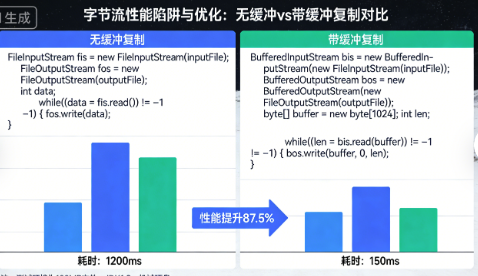
我曾因为不懂缓冲流,让文件复制慢了100倍:
java
// 错误示例:无缓冲的字节复制
public void copyFileSlow(Path source, Path target) throws IOException {
    try (InputStream in = Files.newInputStream(source);
         OutputStream out = Files.newOutputStream(target)) {

        int b;
        while ((b = in.read()) != -1) {  // 每次读取1个字节!
            out.write(b);                 // 每次写入1个字节!
        }
    }
}

// 性能分析:
// 假设复制1GB文件:
// 读取次数:1,073,741,824次 (1GB)
// 写入次数:1,073,741,824次
// 系统调用:2,147,483,648次
// 实际耗时:约30分钟

// 正确示例:带缓冲的字节复制
public void copyFileFast(Path source, Path target) throws IOException {
    try (InputStream in = new BufferedInputStream(Files.newInputStream(source));
         OutputStream out = new BufferedOutputStream(Files.newOutputStream(target))) {

        byte[] buffer = new byte[8192];  // 8KB缓冲区
        int bytesRead;
        while ((bytesRead = in.read(buffer)) != -1) {
            out.write(buffer, 0, bytesRead);
        }
    }
}

// 性能分析:
// 假设复制1GB文件:
// 读取次数:131,072次 (1GB / 8KB)
// 写入次数:131,072次
// 系统调用:262,144次
// 实际耗时:约2秒

// 最优示例:使用NIO的Files.copy
public void copyFileOptimal(Path source, Path target) throws IOException {
    // 内部使用零拷贝技术,性能最好
    Files.copy(source, target, StandardCopyOption.REPLACE_EXISTING);
}
3.2 字符流的编码陷阱
我曾因为编码问题,导致中文日志变成乱码:
java
public class EncodingTrap {

    // 错误:使用平台默认编码
    public void writeLog(String message) throws IOException {
        try (FileWriter writer = new FileWriter("app.log", true)) {
            writer.write(message + "\n");
            // 问题:在中文Windows上是GBK,Linux上是UTF-8
        }
    }

    // 错误:读取时编码不匹配
    public String readLog() throws IOException {
        try (FileReader reader = new FileReader("app.log")) {
            // 如果文件是UTF-8写的,但用GBK读,就乱码了
            char[] buffer = new char[1024];
            int charsRead = reader.read(buffer);
            return new String(buffer, 0, charsRead);
        }
    }

    // 正确:始终指定编码
    public void writeLogSafe(String message) throws IOException {
        // 使用UTF-8编码,明确指定
        try (OutputStreamWriter writer = new OutputStreamWriter(
                new FileOutputStream("app.log", true),
                StandardCharsets.UTF_8)) {
            writer.write(message + "\n");
        }
    }

    // 正确:使用Files类,默认UTF-8
    public void writeLogModern(String message) throws IOException {
        Files.writeString(
            Paths.get("app.log"),
            message + "\n",
            StandardCharsets.UTF_8,
            StandardOpenOption.CREATE,
            StandardOpenOption.APPEND
        );
    }

    // 检测文件编码
    public Charset detectCharset(Path file) throws IOException {
        // 方法1:使用第三方库如juniversalchardet
        // 方法2:尝试常见编码读取

        List<Charset> charsets = Arrays.asList(
            StandardCharsets.UTF_8,
            Charset.forName("GBK"),
            StandardCharsets.ISO_8859_1,
            StandardCharsets.US_ASCII
        );

        for (Charset charset : charsets) {
            try {
                String content = Files.readString(file, charset);
                // 如果读取成功且包含预期字符,可能就是对的
                if (isValidContent(content)) {
                    return charset;
                }
            } catch (CharacterCodingException e) {
                // 这个编码不对,继续尝试下一个
            }
        }

        return StandardCharsets.UTF_8;  // 默认返回UTF-8
    }
}
3.3 大文件处理模式
在处理100GB+的日志文件时,我总结了这些模式:
模式1:流式处理(不加载到内存)
java
public class LargeFileProcessor {

    // 处理大日志文件,统计错误数量
    public long countErrors(Path logFile) throws IOException {
        try (BufferedReader reader = Files.newBufferedReader(logFile, StandardCharsets.UTF_8)) {
            return reader.lines()
                .parallel()  // 可以并行处理行
                .filter(line -> line.contains("ERROR"))
                .count();
        }
    }

    // 流式过滤并写入新文件
    public void filterErrors(Path sourceFile, Path targetFile) throws IOException {
        try (BufferedReader reader = Files.newBufferedReader(sourceFile, StandardCharsets.UTF_8);
             BufferedWriter writer = Files.newBufferedWriter(targetFile, StandardCharsets.UTF_8)) {

            reader.lines()
                .filter(line -> line.contains("ERROR"))
                .forEach(line -> {
                    try {
                        writer.write(line);
                        writer.newLine();
                    } catch (IOException e) {
                        throw new UncheckedIOException(e);
                    }
                });
        }
    }
}
模式2:内存映射文件(Memory-Mapped Files)
java
public class MemoryMappedFileReader {

    // 使用内存映射处理超大文件
    public void processLargeFile(Path file) throws IOException {
        try (FileChannel channel = FileChannel.open(file, StandardOpenOption.READ)) {
            long fileSize = channel.size();

            // 将文件映射到内存
            MappedByteBuffer buffer = channel.map(
                FileChannel.MapMode.READ_ONLY,
                0,           // 起始位置
                Math.min(fileSize, Integer.MAX_VALUE)  // 映射大小,不能超过2GB
            );

            // 直接操作内存,无需系统调用
            while (buffer.hasRemaining()) {
                byte b = buffer.get();
                // 处理字节
            }
        }
    }

    // 分块处理超大文件
    public void processHugeFile(Path file) throws IOException {
        try (FileChannel channel = FileChannel.open(file, StandardOpenOption.READ)) {
            long fileSize = channel.size();
            long position = 0;
            final long CHUNK_SIZE = 1024 * 1024 * 1024;  // 1GB chunks

            while (position < fileSize) {
                long size = Math.min(CHUNK_SIZE, fileSize - position);

                MappedByteBuffer buffer = channel.map(
                    FileChannel.MapMode.READ_ONLY,
                    position,
                    size
                );

                processChunk(buffer);
                position += size;
            }
        }
    }

    private void processChunk(ByteBuffer buffer) {
        // 处理一个数据块
        while (buffer.hasRemaining()) {
            byte b = buffer.get();
            // 处理逻辑
        }
    }
}
3.4 对象序列化的高级技巧
在分布式系统中,我总结了这些序列化经验:
java
public class AdvancedSerialization {

    // 自定义序列化过程
    public static class User implements Serializable {
        private static final long serialVersionUID = 1L;

        private String username;
        private transient String password;  // 不序列化密码
        private transient int loginCount;   // 临时数据,不序列化

        // 自定义序列化逻辑
        private void writeObject(ObjectOutputStream out) throws IOException {
            out.defaultWriteObject();  // 序列化非transient字段

            // 添加版本信息
            out.writeUTF("v2.0");

            // 序列化一些额外的元数据
            out.writeLong(System.currentTimeMillis());
        }

        private void readObject(ObjectInputStream in) throws IOException, ClassNotFoundException {
            in.defaultReadObject();  // 反序列化非transient字段

            // 读取版本信息
            String version = in.readUTF();
            if (!"v2.0".equals(version)) {
                throw new InvalidClassException("不支持的版本: " + version);
            }

            // 读取元数据
            long timestamp = in.readLong();
            System.out.println("序列化时间: " + new Date(timestamp));

            // 初始化transient字段
            this.loginCount = 0;
        }

        // 序列化代理模式(完全控制序列化形式)
        private Object writeReplace() {
            return new UserProxy(this);
        }

        // 反序列化代理
        private static class UserProxy implements Serializable {
            private final String username;

            UserProxy(User user) {
                this.username = user.username;
            }

            private Object readResolve() {
                User user = new User();
                user.username = this.username;
                user.loginCount = 0;
                return user;
            }
        }
    }

    // 使用Externalizable接口(完全自定义序列化)
    public static class Config implements Externalizable {
        private Map<String, String> settings = new HashMap<>();

        @Override
        public void writeExternal(ObjectOutput out) throws IOException {
            // 只序列化必要的字段
            out.writeInt(settings.size());
            for (Map.Entry<String, String> entry : settings.entrySet()) {
                out.writeUTF(entry.getKey());
                out.writeUTF(entry.getValue());
            }
        }

        @Override
        public void readExternal(ObjectInput in) throws IOException, ClassNotFoundException {
            settings.clear();
            int size = in.readInt();
            for (int i = 0; i < size; i++) {
                String key = in.readUTF();
                String value = in.readUTF();
                settings.put(key, value);
            }
        }
    }

    // 使用Kryo或Protobuf等高效序列化库
    public byte[] serializeWithKryo(Object obj) {
        Kryo kryo = new Kryo();
        kryo.setReferences(false);  // 关闭引用跟踪,提高性能
        kryo.setRegistrationRequired(false);  // 允许非注册类

        try (Output output = new Output(1024, -1)) {
            kryo.writeClassAndObject(output, obj);
            return output.toBytes();
        }
    }
}
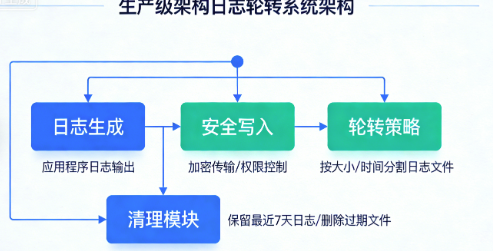
四、实战:重构日志轮转系统
基于那次107GB日志的事故,我重新设计了日志系统:
java
public class LogRotationSystem {
    private final Path logDir;
    private final int maxFilesPerDay;
    private final long maxFileSize;
    private final int retentionDays;

    public LogRotationSystem(Path logDir, int maxFilesPerDay, long maxFileSize, int retentionDays) {
        this.logDir = logDir;
        this.maxFilesPerDay = maxFilesPerDay;
        this.maxFileSize = maxFileSize;  // 如100MB
        this.retentionDays = retentionDays;
    }

    // 线程安全的日志写入
    public void writeLog(String message) throws IOException {
        Path currentLog = getCurrentLogFile();

        // 检查文件大小,如果过大则轮转
        if (Files.exists(currentLog) && Files.size(currentLog) >= maxFileSize) {
            rotateLog();
        }

        // 原子性写入
        writeLineAtomic(currentLog, message);
    }

    private void writeLineAtomic(Path file, String line) throws IOException {
        // 使用临时文件+原子移动,保证即使崩溃也不丢失数据
        Path tempFile = Files.createTempFile("log", ".tmp");

        try {
            // 如果原文件存在,先复制内容
            if (Files.exists(file)) {
                Files.copy(file, tempFile, StandardCopyOption.REPLACE_EXISTING);
            }

            // 追加新行
            Files.writeString(tempFile,
                line + System.lineSeparator(),
                StandardCharsets.UTF_8,
                StandardOpenOption.APPEND);

            // 原子性地移动
            Files.move(tempFile, file,
                StandardCopyOption.ATOMIC_MOVE,
                StandardCopyOption.REPLACE_EXISTING);

        } finally {
            // 清理临时文件
            Files.deleteIfExists(tempFile);
        }
    }

    private void rotateLog() throws IOException {
        String timestamp = LocalDateTime.now()
            .format(DateTimeFormatter.ofPattern("yyyy-MM-dd_HH-mm-ss"));

        Path rotatedFile = logDir.resolve("app." + timestamp + ".log");
        Path currentLog = getCurrentLogFile();

        if (Files.exists(currentLog)) {
            Files.move(currentLog, rotatedFile, StandardCopyOption.ATOMIC_MOVE);
        }

        // 清理旧文件
        cleanupOldLogs();
    }

    private void cleanupOldLogs() {
        try {
            // 使用Files.find安全遍历
            try (Stream<Path> stream = Files.find(logDir, 1,
                    (path, attrs) -> {
                        try {
                            return attrs.isRegularFile() &&
                                   path.getFileName().toString().startsWith("app.") &&
                                   path.getFileName().toString().endsWith(".log") &&
                                   !path.equals(getCurrentLogFile());
                        } catch (IOException e) {
                            return false;
                        }
                    })) {

                // 按修改时间分组(每天)
                Map<LocalDate, List<Path>> logsByDay = stream
                    .collect(Collectors.groupingBy(path -> {
                        try {
                            FileTime lastModified = Files.getLastModifiedTime(path);
                            return Instant.ofEpochMilli(lastModified.toMillis())
                                          .atZone(ZoneId.systemDefault())
                                          .toLocalDate();
                        } catch (IOException e) {
                            return LocalDate.MIN;
                        }
                    }));

                // 清理策略:每保留最近N天的日志,每天最多保留M个文件
                LocalDate cutoffDate = LocalDate.now().minusDays(retentionDays);

                for (Map.Entry<LocalDate, List<Path>> entry : logsByDay.entrySet()) {
                    LocalDate date = entry.getKey();
                    List<Path> logs = entry.getValue();

                    if (date.isBefore(cutoffDate)) {
                        // 删除过期日志
                        logs.forEach(path -> {
                            try {
                                Files.delete(path);
                            } catch (IOException e) {
                                System.err.println("无法删除日志文件: " + path);
                            }
                        });
                    } else {
                        // 每天只保留最新的maxFilesPerDay个文件
                        if (logs.size() > maxFilesPerDay) {
                            logs.stream()
                                .sorted(Comparator.comparing(path -> {
                                    try {
                                        return Files.getLastModifiedTime(path);
                                    } catch (IOException e) {
                                        return FileTime.from(Instant.MIN);
                                    }
                                }))
                                .limit(logs.size() - maxFilesPerDay)
                                .forEach(path -> {
                                    try {
                                        Files.delete(path);
                                    } catch (IOException e) {
                                        System.err.println("无法删除日志文件: " + path);
                                    }
                                });
                        }
                    }
                }
            }
        } catch (IOException e) {
            // 清理失败不应该影响主流程
            System.err.println("日志清理失败: " + e.getMessage());
        }
    }

    private Path getCurrentLogFile() {
        return logDir.resolve("app.log");
    }

    // 安全的递归删除(带防护)
    public void safeDeleteDirectory(Path dir) throws IOException {
        // 防护:检查是否在允许的目录内
        if (!dir.startsWith(logDir)) {
            throw new SecurityException("禁止删除目录: " + dir);
        }

        // 防护:检查深度,防止递归过深
        if (dir.getNameCount() - logDir.getNameCount() > 10) {
            throw new SecurityException("目录深度过大: " + dir);
        }

        // 使用Files.walk,但限制深度和检查符号链接
        try (Stream<Path> stream = Files.walk(dir, 10)) {
            List<Path> paths = stream
                .sorted(Comparator.reverseOrder())  // 先删除文件,再删除目录
                .collect(Collectors.toList());

            for (Path path : paths) {
                try {
                    // 检查是否是符号链接
                    if (Files.isSymbolicLink(path)) {
                        // 删除符号链接本身,但不跟踪它
                        Files.delete(path);
                    } else {
                        Files.delete(path);
                    }
                } catch (IOException e) {
                    System.err.println("无法删除: " + path + ", 错误: " + e.getMessage());
                    // 继续删除其他文件
                }
            }
        }
    }
}
经验总结:我的文件操作检查清单
安全性检查清单
- 是否检查了符号链接?
- 是否验证了文件路径在允许的目录内?
- 是否处理了权限不足的情况?
- 递归时是否限制了最大深度?
- 是否防止了路径遍历攻击?
性能检查清单
- 是否使用了缓冲流?
- 缓冲区大小是否合适(通常8KB-64KB)?
- 大文件处理是否使用流式或内存映射?
- 递归是否可能栈溢出,是否需要改为迭代?
- 是否关闭了所有资源(使用try-with-resources)?
健壮性检查清单
- 是否处理了文件不存在的情况?
- 是否考虑了并发访问?
- 是否支持文件被其他进程修改的情况?
- 操作是否原子性(要么全成功,要么全失败)?
- 是否有足够的错误信息和日志?
编码检查清单
- 文本文件是否明确指定了编码?
- 是否支持多字节字符(如中文)?
- 是否处理了不同平台的换行符?
- 序列化时是否考虑版本兼容性?
最后的真相
那场107GB日志的事故,虽然让我损失了年终奖,但也教会了我:
- 文件操作不是"简单"的:每个文件操作都可能成为安全漏洞或性能瓶颈
- 递归是双刃剑:简洁但危险,必须设置明确的终止条件和边界检查
- 编码是隐形杀手:乱码问题往往在部署到不同环境后才暴露
- 资源泄漏是慢性毒药:不关闭流,系统会慢慢死亡
现在,每次写文件操作代码,我都会问自己:
- 如果这个路径是符号链接怎么办?
- 如果磁盘满了怎么办?
- 如果文件被其他进程锁定了怎么办?
- 如果程序崩溃了,数据会丢失吗?
因为在生产环境中,没有"小bug",只有"还没造成大损失的bug"。文件系统是你的程序与真实世界交互的边界,这里发生的错误,往往会直接影响到真实业务。
知识点测试
读完文章了?来测试一下你对知识点的掌握程度吧!
评论区
使用 GitHub 账号登录后即可发表评论,支持 Markdown 格式。
如果评论系统无法加载,请确保:
- 您的网络可以访问 GitHub
- giscus GitHub App 已安装到仓库
- 仓库已启用 Discussions 功能